Getting Started
Install paste python package
You can install the package on pypi: https://pypi.org/project/paste-bio/
[1]:
import math
import time
import pandas as pd
import numpy as np
import scanpy as sc
import seaborn as sns
import matplotlib.pyplot as plt
import matplotlib.patches as mpatches
from matplotlib import style
import paste as pst
Read data and create AnnData object
[2]:
data_dir = './sample_data/'

# Assume that the coordinates of slices are named slice_name + "_coor.csv"
def load_slices(data_dir, slice_names=["slice1", "slice2", "slice3", "slice4"]):
    slices = []
    for slice_name in slice_names:
        slice_i = sc.read_csv(data_dir + slice_name + ".csv")
        slice_i_coor = np.genfromtxt(data_dir + slice_name + "_coor.csv", delimiter = ',')
        slice_i.obsm['spatial'] = slice_i_coor
        # Preprocess slices
        sc.pp.filter_genes(slice_i, min_counts = 15)
        sc.pp.filter_cells(slice_i, min_counts = 100)
        slices.append(slice_i)
    return slices

slices = load_slices(data_dir)
slice1, slice2, slice3, slice4 = slices
Each AnnData object consists of a gene expression matrx and spatial coordinate matrix.
[3]:
slice1.X
[3]:
array([[12.,  0.,  6., ...,  0.,  0.,  0.],
       [ 7.,  0.,  1., ...,  1.,  0.,  0.],
       [15.,  1.,  4., ...,  0.,  0.,  1.],
       ...,
       [ 0.,  0.,  0., ...,  0.,  0.,  0.],
       [ 1.,  0.,  0., ...,  0.,  0.,  0.],
       [ 5.,  0.,  1., ...,  1.,  0.,  0.]], dtype=float32)
[4]:
slice1.obsm['spatial'][0:5,:]
[4]:
array([[13.064,  6.086],
       [12.116,  7.015],
       [13.945,  6.999],
       [12.987,  7.011],
       [15.011,  7.984]])
Note, you can choose to label the spots however you want. In this case, we use the default coordinates.
[5]:
slice1.obs
[5]:
| n_counts | |
|---|---|
| 13.064x6.086 | 2181.0 |
| 12.116x7.015 | 2295.0 |
| 13.945x6.999 | 3375.0 |
| 12.987x7.011 | 2935.0 |
| 15.011x7.984 | 2964.0 |
| ... | ... |
| 21.953x24.847 | 541.0 |
| 20.98x24.963 | 860.0 |
| 20.063x24.964 | 508.0 |
| 19.007x25.045 | 626.0 |
| 21.957x25.871 | 2515.0 |
254 rows × 1 columns
[6]:
slice1.var
[6]:
| n_counts | |
|---|---|
| GAPDH | 2233.0 |
| UBE2G2 | 78.0 |
| MAPKAPK2 | 255.0 |
| NDUFA7 | 96.0 |
| ASNA1 | 172.0 |
| ... | ... |
| DIP2C | 31.0 |
| LYPLA2 | 19.0 |
| RGP1 | 24.0 |
| BPGM | 17.0 |
| HPS6 | 16.0 |
7998 rows × 1 columns
We can visualize the spatial coordinates of our slices using plot_slices.
[7]:
slice_colors = ['#e41a1c','#377eb8','#4daf4a','#984ea3']

fig, axs = plt.subplots(2, 2,figsize=(7,7))
pst.plot_slice(slice1,slice_colors[0],ax=axs[0,0])
pst.plot_slice(slice2,slice_colors[1],ax=axs[0,1])
pst.plot_slice(slice3,slice_colors[2],ax=axs[1,0])
pst.plot_slice(slice4,slice_colors[3],ax=axs[1,1])
plt.show()

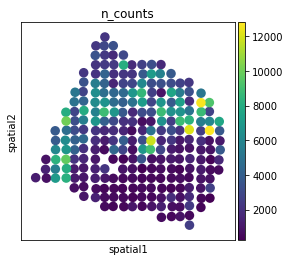
We can also plot using Scanpy’s spatial plotting function.
[8]:
sc.pl.spatial(slice1, color = "n_counts", spot_size = 1)
Pairwise Alignment
Run PASTE pairwise_align.
[9]:
start = time.time()

pi12 = pst.pairwise_align(slice1, slice2)
pi23 = pst.pairwise_align(slice2, slice3)
pi34 = pst.pairwise_align(slice3, slice4)

print('Runtime: ' + str(time.time() - start))
Using selected backend cpu. If you want to use gpu, set use_gpu = True.
Using selected backend cpu. If you want to use gpu, set use_gpu = True.
Using selected backend cpu. If you want to use gpu, set use_gpu = True.
Runtime: 0.5836582183837891
[10]:
pd.DataFrame(pi12)
[10]:
| 0 | 1 | 2 | 3 | 4 | 5 | 6 | 7 | 8 | 9 | ... | 240 | 241 | 242 | 243 | 244 | 245 | 246 | 247 | 248 | 249 | |
|---|---|---|---|---|---|---|---|---|---|---|---|---|---|---|---|---|---|---|---|---|---|
| 0 | 0.003937 | 0.000000 | 0.000000 | 0.0 | 0.0 | 0.000000 | 0.000000 | 0.0 | 0.0 | 0.0 | ... | 0.0 | 0.00000 | 0.000000 | 0.000000 | 0.0 | 0.000000 | 0.0 | 0.000000 | 0.000000 | 0.000000 |
| 1 | 0.000063 | 0.003874 | 0.000000 | 0.0 | 0.0 | 0.000000 | 0.000000 | 0.0 | 0.0 | 0.0 | ... | 0.0 | 0.00000 | 0.000000 | 0.000000 | 0.0 | 0.000000 | 0.0 | 0.000000 | 0.000000 | 0.000000 |
| 2 | 0.000000 | 0.000000 | 0.000000 | 0.0 | 0.0 | 0.003937 | 0.000000 | 0.0 | 0.0 | 0.0 | ... | 0.0 | 0.00000 | 0.000000 | 0.000000 | 0.0 | 0.000000 | 0.0 | 0.000000 | 0.000000 | 0.000000 |
| 3 | 0.000000 | 0.000126 | 0.003811 | 0.0 | 0.0 | 0.000000 | 0.000000 | 0.0 | 0.0 | 0.0 | ... | 0.0 | 0.00000 | 0.000000 | 0.000000 | 0.0 | 0.000000 | 0.0 | 0.000000 | 0.000000 | 0.000000 |
| 4 | 0.000000 | 0.000000 | 0.000000 | 0.0 | 0.0 | 0.000000 | 0.003874 | 0.0 | 0.0 | 0.0 | ... | 0.0 | 0.00000 | 0.000000 | 0.000000 | 0.0 | 0.000000 | 0.0 | 0.000000 | 0.000000 | 0.000000 |
| ... | ... | ... | ... | ... | ... | ... | ... | ... | ... | ... | ... | ... | ... | ... | ... | ... | ... | ... | ... | ... | ... |
| 249 | 0.000000 | 0.000000 | 0.000000 | 0.0 | 0.0 | 0.000000 | 0.000000 | 0.0 | 0.0 | 0.0 | ... | 0.0 | 0.00000 | 0.000000 | 0.000000 | 0.0 | 0.000189 | 0.0 | 0.003622 | 0.000063 | 0.000063 |
| 250 | 0.000000 | 0.000000 | 0.000000 | 0.0 | 0.0 | 0.000000 | 0.000000 | 0.0 | 0.0 | 0.0 | ... | 0.0 | 0.00000 | 0.000000 | 0.000000 | 0.0 | 0.000000 | 0.0 | 0.000000 | 0.003937 | 0.000000 |
| 251 | 0.000000 | 0.000000 | 0.000000 | 0.0 | 0.0 | 0.000000 | 0.000000 | 0.0 | 0.0 | 0.0 | ... | 0.0 | 0.00000 | 0.001606 | 0.001953 | 0.0 | 0.000000 | 0.0 | 0.000378 | 0.000000 | 0.000000 |
| 252 | 0.000000 | 0.000000 | 0.000000 | 0.0 | 0.0 | 0.000000 | 0.000000 | 0.0 | 0.0 | 0.0 | ... | 0.0 | 0.00189 | 0.000000 | 0.002047 | 0.0 | 0.000000 | 0.0 | 0.000000 | 0.000000 | 0.000000 |
| 253 | 0.000000 | 0.000000 | 0.000000 | 0.0 | 0.0 | 0.000000 | 0.000000 | 0.0 | 0.0 | 0.0 | ... | 0.0 | 0.00000 | 0.000000 | 0.000000 | 0.0 | 0.000000 | 0.0 | 0.000000 | 0.000000 | 0.003937 |
254 rows × 250 columns
Sequential pairwise slice alignment plots
[11]:
pis = [pi12, pi23, pi34]
slices = [slice1, slice2, slice3, slice4]

new_slices = pst.stack_slices_pairwise(slices, pis)
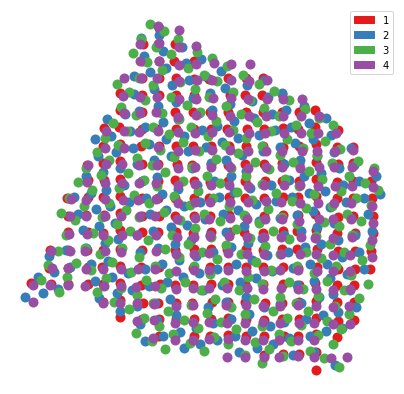
Now that we’ve aligned the spatial coordinates, we can plot them all on the same coordinate system.
[12]:
slice_colors = ['#e41a1c','#377eb8','#4daf4a','#984ea3']

plt.figure(figsize=(7,7))
for i in range(len(new_slices)):
    pst.plot_slice(new_slices[i],slice_colors[i],s=400)
plt.legend(handles=[mpatches.Patch(color=slice_colors[0], label='1'),mpatches.Patch(color=slice_colors[1], label='2'),mpatches.Patch(color=slice_colors[2], label='3'),mpatches.Patch(color=slice_colors[3], label='4')])
plt.gca().invert_yaxis()
plt.axis('off')
plt.show()
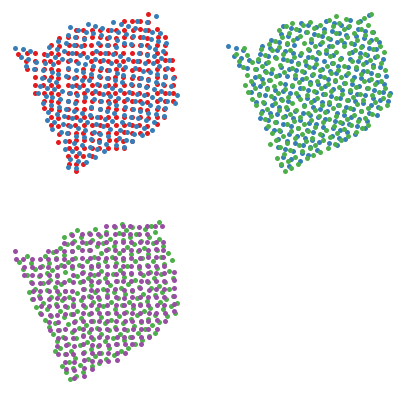
We can also plot pairwise layers together.
[13]:
slice_colors = ['#e41a1c','#377eb8','#4daf4a','#984ea3']

fig, axs = plt.subplots(2, 2,figsize=(7,7))
pst.plot_slice(new_slices[0], slice_colors[0], ax=axs[0,0])
pst.plot_slice(new_slices[1], slice_colors[1], ax=axs[0,0])
pst.plot_slice(new_slices[1], slice_colors[1], ax=axs[0,1])
pst.plot_slice(new_slices[2], slice_colors[2], ax=axs[0,1])
pst.plot_slice(new_slices[2], slice_colors[2], ax=axs[1,0])
pst.plot_slice(new_slices[3], slice_colors[3], ax=axs[1,0])
fig.delaxes(axs[1,1])
plt.show()
We can also plot the slices in 3-D.
[14]:
import plotly.express as px
import plotly.io as pio
pio.renderers.default='notebook'

slices_colors = ['#e41a1c','#377eb8','#4daf4a','#984ea3']

# scale the distance between layers
z_scale = 2

values = []
for i,L in enumerate(new_slices):
    for x,y in L.obsm['spatial']:
        values.append([x, y, i*z_scale, str(i)])
df = pd.DataFrame(values, columns=['x','y','z','slice'])
fig = px.scatter_3d(df, x='x', y='y', z='z',
              color='slice',color_discrete_sequence=slice_colors)
fig.update_layout(scene_aspectmode='data')
fig.show()
Center Alignment
First, we will read in and preprocess the data (if you ran pairwise_align above, it will be altered).
[15]:
slices = load_slices(data_dir)
slice1, slice2, slice3, slice4 = slices
Run PASTE center_align.
[16]:
slices = [slice1, slice2, slice3, slice4]
initial_slice = slice1.copy()
lmbda = len(slices)*[1/len(slices)]
Now, for center alignment, we can provide initial mappings between the center and original slices to PASTE to improve the algorithm. However, note this is optional.
[17]:
pst.filter_for_common_genes(slices)

b = []
for i in range(len(slices)):
    b.append(pst.match_spots_using_spatial_heuristic(slices[0].X, slices[i].X))
Filtered all slices for common genes. There are 6397 common genes.
[18]:
start = time.time()

center_slice, pis = pst.center_align(initial_slice, slices, lmbda, random_seed = 5, pis_init = b)

print('Runtime: ' + str(time.time() - start))
Using selected backend cpu. If you want to use gpu, set use_gpu = True.
Filtered all slices for common genes. There are 6397 common genes.
/home/max/Programs/envs/spatialOT/lib/python3.8/site-packages/sklearn/decomposition/_nmf.py:1076: ConvergenceWarning:

Maximum number of iterations 200 reached. Increase it to improve convergence.
Iteration: 0
Solving Pairwise Slice Alignment Problem.
Solving Center Mapping NMF Problem.
/home/max/Programs/envs/spatialOT/lib/python3.8/site-packages/sklearn/decomposition/_nmf.py:1076: ConvergenceWarning:

Maximum number of iterations 200 reached. Increase it to improve convergence.
Objective  1.42119034779904
Difference: 1.42119034779904

Iteration: 1
Solving Pairwise Slice Alignment Problem.
Solving Center Mapping NMF Problem.
/home/max/Programs/envs/spatialOT/lib/python3.8/site-packages/sklearn/decomposition/_nmf.py:1076: ConvergenceWarning:

Maximum number of iterations 200 reached. Increase it to improve convergence.
Objective  1.3973178012733354
Difference: 0.023872546525704585

Iteration: 2
Solving Pairwise Slice Alignment Problem.
Solving Center Mapping NMF Problem.
Objective  1.3967427058538635
Difference: 0.0005750954194718716

Runtime: 11.849297285079956
/home/max/Programs/envs/spatialOT/lib/python3.8/site-packages/sklearn/decomposition/_nmf.py:1076: ConvergenceWarning:

Maximum number of iterations 200 reached. Increase it to improve convergence.
Again, we can run center align without providing intial mappings below.
[19]:
# center_slice, pis = paste.center_align(initial_slice, slices, lmbda, random_seed = 5)
center_slice returns an AnnData object that also includes the low dimensional representation of our inferred center slice.
[20]:
center_slice.uns['paste_W']
[20]:
array([[2.23237598e-02, 1.14087162e+00, 9.58007337e-02, ...,
        7.89308199e-02, 1.35525808e-02, 1.29490388e-03],
       [4.23211589e-04, 3.82036845e-01, 1.95311398e-01, ...,
        3.97314769e-03, 1.30214566e-03, 6.30798032e-03],
       [1.59148391e-01, 1.59327668e-01, 7.87353959e-02, ...,
        2.27056510e-02, 6.34641837e-02, 1.40540096e-01],
       ...,
       [3.22691089e-02, 6.62650834e-04, 7.03813042e-02, ...,
        9.94040232e-04, 4.48582747e-03, 1.87143452e-01],
       [4.13513237e-02, 3.07151849e-03, 1.11811249e-01, ...,
        8.04589919e-03, 3.06158517e-04, 1.56736132e-01],
       [1.89361986e-01, 5.70979580e-05, 6.44658939e-03, ...,
        1.27158897e-04, 7.24546648e-03, 3.28253786e-02]])
[21]:
center_slice.uns['paste_H']
[21]:
array([[4.70866524e-01, 7.03703110e-02, 1.95729740e-02, ...,
        2.49784848e-02, 1.81434916e-02, 3.73244360e-02],
       [1.89843453e+00, 1.21216273e-01, 2.92930246e-01, ...,
        9.54992284e-02, 1.13389243e-01, 1.27972992e-02],
       [1.77937553e+00, 1.04479731e-01, 1.42932180e-01, ...,
        5.81047561e-02, 4.50576125e-02, 2.65283562e-02],
       ...,
       [2.71336626e+00, 1.83430076e-01, 5.47662565e-01, ...,
        5.24410308e-02, 5.50516787e-05, 6.20249102e-08],
       [9.65690784e-01, 1.49039550e-01, 9.42255518e-02, ...,
        8.73865104e-06, 5.63785405e-03, 5.51648331e-03],
       [5.50727274e+00, 2.28139877e-02, 2.63350947e-01, ...,
        5.88726839e-15, 7.02571694e-02, 0.00000000e+00]])
Center slice alignment plots
Next, we can use the outputs of center_align to align the slices.
[22]:
center, new_slices = pst.stack_slices_center(center_slice, slices, pis)
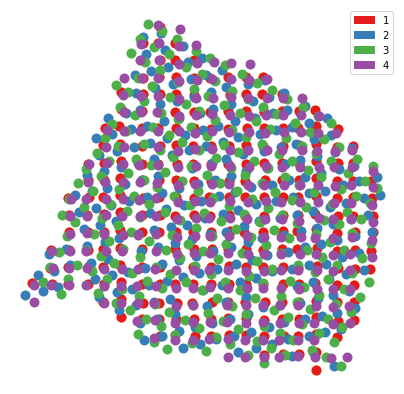
Now that we’ve aligned the spatial coordinates, we can plot them all on the same coordinate system. Note the center slice is not plotted.
[23]:
center_color = 'orange'
slices_colors = ['#e41a1c','#377eb8','#4daf4a','#984ea3']

plt.figure(figsize=(7,7))
pst.plot_slice(center,center_color,s=400)
for i in range(len(new_slices)):
    pst.plot_slice(new_slices[i],slices_colors[i],s=400)

plt.legend(handles=[mpatches.Patch(color=slices_colors[0], label='1'),mpatches.Patch(color=slices_colors[1], label='2'),mpatches.Patch(color=slices_colors[2], label='3'),mpatches.Patch(color=slices_colors[3], label='4')])
plt.gca().invert_yaxis()
plt.axis('off')
plt.show()
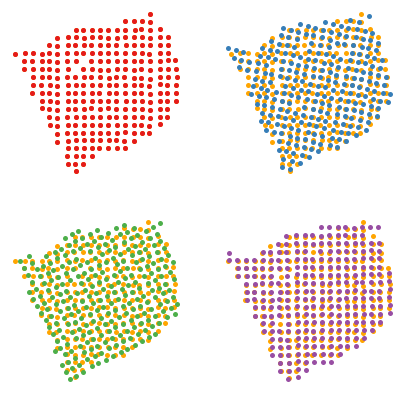
Next, we plot each slice compared to the center.
Note that since we used slice1 as the coordinates for the center slice, they remain the same, and thus we cannot see both in our plots below.
[24]:
center_color = 'orange'
slice_colors = ['#e41a1c','#377eb8','#4daf4a','#984ea3']

fig, axs = plt.subplots(2, 2,figsize=(7,7))
pst.plot_slice(center,center_color,ax=axs[0,0])
pst.plot_slice(new_slices[0],slice_colors[0],ax=axs[0,0])

pst.plot_slice(center,center_color,ax=axs[0,1])
pst.plot_slice(new_slices[1],slice_colors[1],ax=axs[0,1])

pst.plot_slice(center,center_color,ax=axs[1,0])
pst.plot_slice(new_slices[2],slice_colors[2],ax=axs[1,0])

pst.plot_slice(center,center_color,ax=axs[1,1])
pst.plot_slice(new_slices[3],slice_colors[3],ax=axs[1,1])
plt.show()
Gpu Implementation
POT allows us to write backend agnostic code, allowing us to use Numpy, Pytorch, etc to calculate our computations (https://pythonot.github.io/gen_modules/ot.backend.html).
We have updated our code to include gpu support for Pytorch.
First, you want to make sure you have torch installed. One way to check is by running:
[25]:
import ot
ot.backend.get_backend_list()
WARNING:absl:No GPU/TPU found, falling back to CPU. (Set TF_CPP_MIN_LOG_LEVEL=0 and rerun for more info.)
[25]:
[<ot.backend.NumpyBackend at 0x7fd6f387b160>,
 <ot.backend.TorchBackend at 0x7fd6f387b670>,
 <ot.backend.JaxBackend at 0x7fd8a44d2730>,
 <ot.backend.CupyBackend at 0x7fd6f3911b80>]
By default, you should have ot.backend.NumpyBackend(). To use our gpu, make sure you have ot.backend.TorchBackend().
If not, install torch: https://pytorch.org/
Note: From our tests, ot.backend.TorchBackend() is still faster than ot.backend.NumpyBackend() even if you ONLY use cpu, so we recommend trying it if you would like to speed up your calculations.
Now, assuming you have torch installed, we check to make sure you have access to gpu. PASTE automatically does this check for you, but it is still helpful to know if you want to debug why you can’t seem to access your gpu.
[26]:
import torch
torch.cuda.is_available()
[26]:
True
Running PASTE with gpu
Note: Since the breast dataset is small, cpu may actually be faster than gpu in this particular case. For larger datasets, you will see a greater improvement in gpu vs cpu.
First, we read in our data.
[27]:
data_dir = './sample_data/'

# Assume that the coordinates of slices are named slice_name + "_coor.csv"
def load_slices(data_dir, slice_names=["slice1", "slice2", "slice3", "slice4"]):
    slices = []
    for slice_name in slice_names:
        slice_i = sc.read_csv(data_dir + slice_name + ".csv")
        slice_i_coor = np.genfromtxt(data_dir + slice_name + "_coor.csv", delimiter = ',')
        slice_i.obsm['spatial'] = slice_i_coor
        # Preprocess slices
        sc.pp.filter_genes(slice_i, min_counts = 15)
        sc.pp.filter_cells(slice_i, min_counts = 100)
        slices.append(slice_i)
    return slices

slices = load_slices(data_dir)
slice1, slice2, slice3, slice4 = slices
Next, running with gpu is as easy as setting two parameters in our function.
[28]:
start = time.time()

pi12 = pst.pairwise_align(slice1, slice2, backend = ot.backend.TorchBackend(), use_gpu = True)
pi23 = pst.pairwise_align(slice2, slice3, backend = ot.backend.TorchBackend(), use_gpu = True)
pi34 = pst.pairwise_align(slice3, slice4, backend = ot.backend.TorchBackend(), use_gpu = True)

print('Runtime: ' + str(time.time() - start))
gpu is available, using gpu.
gpu is available, using gpu.
gpu is available, using gpu.
Runtime: 0.37587952613830566
[29]:
pd.DataFrame(pi12)
[29]:
| 0 | 1 | 2 | 3 | 4 | 5 | 6 | 7 | 8 | 9 | ... | 240 | 241 | 242 | 243 | 244 | 245 | 246 | 247 | 248 | 249 | |
|---|---|---|---|---|---|---|---|---|---|---|---|---|---|---|---|---|---|---|---|---|---|
| 0 | 0.003937 | 0.000000 | 0.000000 | 0.0 | 0.0 | 0.000000 | 0.000000 | 0.0 | 0.0 | 0.0 | ... | 0.0 | 0.00000 | 0.000000 | 0.000000 | 0.0 | 0.000000 | 0.0 | 0.000000 | 0.000000 | 0.000000 |
| 1 | 0.000063 | 0.003874 | 0.000000 | 0.0 | 0.0 | 0.000000 | 0.000000 | 0.0 | 0.0 | 0.0 | ... | 0.0 | 0.00000 | 0.000000 | 0.000000 | 0.0 | 0.000000 | 0.0 | 0.000000 | 0.000000 | 0.000000 |
| 2 | 0.000000 | 0.000000 | 0.000000 | 0.0 | 0.0 | 0.003937 | 0.000000 | 0.0 | 0.0 | 0.0 | ... | 0.0 | 0.00000 | 0.000000 | 0.000000 | 0.0 | 0.000000 | 0.0 | 0.000000 | 0.000000 | 0.000000 |
| 3 | 0.000000 | 0.000126 | 0.003811 | 0.0 | 0.0 | 0.000000 | 0.000000 | 0.0 | 0.0 | 0.0 | ... | 0.0 | 0.00000 | 0.000000 | 0.000000 | 0.0 | 0.000000 | 0.0 | 0.000000 | 0.000000 | 0.000000 |
| 4 | 0.000000 | 0.000000 | 0.000000 | 0.0 | 0.0 | 0.000000 | 0.003874 | 0.0 | 0.0 | 0.0 | ... | 0.0 | 0.00000 | 0.000000 | 0.000000 | 0.0 | 0.000000 | 0.0 | 0.000000 | 0.000000 | 0.000000 |
| ... | ... | ... | ... | ... | ... | ... | ... | ... | ... | ... | ... | ... | ... | ... | ... | ... | ... | ... | ... | ... | ... |
| 249 | 0.000000 | 0.000000 | 0.000000 | 0.0 | 0.0 | 0.000000 | 0.000000 | 0.0 | 0.0 | 0.0 | ... | 0.0 | 0.00000 | 0.000000 | 0.000000 | 0.0 | 0.000189 | 0.0 | 0.003622 | 0.000063 | 0.000063 |
| 250 | 0.000000 | 0.000000 | 0.000000 | 0.0 | 0.0 | 0.000000 | 0.000000 | 0.0 | 0.0 | 0.0 | ... | 0.0 | 0.00000 | 0.000000 | 0.000000 | 0.0 | 0.000000 | 0.0 | 0.000000 | 0.003937 | 0.000000 |
| 251 | 0.000000 | 0.000000 | 0.000000 | 0.0 | 0.0 | 0.000000 | 0.000000 | 0.0 | 0.0 | 0.0 | ... | 0.0 | 0.00000 | 0.001606 | 0.001953 | 0.0 | 0.000000 | 0.0 | 0.000378 | 0.000000 | 0.000000 |
| 252 | 0.000000 | 0.000000 | 0.000000 | 0.0 | 0.0 | 0.000000 | 0.000000 | 0.0 | 0.0 | 0.0 | ... | 0.0 | 0.00189 | 0.000000 | 0.002047 | 0.0 | 0.000000 | 0.0 | 0.000000 | 0.000000 | 0.000000 |
| 253 | 0.000000 | 0.000000 | 0.000000 | 0.0 | 0.0 | 0.000000 | 0.000000 | 0.0 | 0.0 | 0.0 | ... | 0.0 | 0.00000 | 0.000000 | 0.000000 | 0.0 | 0.000000 | 0.0 | 0.000000 | 0.000000 | 0.003937 |
254 rows × 250 columns
We do the same with center_align().
Note: This time, we skip providing initial mappings pi_init = b as previously done above.
[30]:
slices = load_slices(data_dir)
slice1, slice2, slice3, slice4 = slices

slices = [slice1, slice2, slice3, slice4]
initial_slice = slice1.copy()
lmbda = len(slices)*[1/len(slices)]
[31]:
start = time.time()

center_slice, pis = pst.center_align(initial_slice, slices, lmbda, random_seed = 5, backend = ot.backend.TorchBackend(), use_gpu = True)

print('Runtime: ' + str(time.time() - start))
gpu is available, using gpu.
Filtered all slices for common genes. There are 6397 common genes.
/home/max/Programs/envs/spatialOT/lib/python3.8/site-packages/sklearn/decomposition/_nmf.py:1076: ConvergenceWarning:

Maximum number of iterations 200 reached. Increase it to improve convergence.
Iteration: 0
Solving Pairwise Slice Alignment Problem.
Solving Center Mapping NMF Problem.
/home/max/Programs/envs/spatialOT/lib/python3.8/site-packages/sklearn/decomposition/_nmf.py:1076: ConvergenceWarning:

Maximum number of iterations 200 reached. Increase it to improve convergence.
Objective  1.4716356992721558
Difference: 1.4716356992721558

Iteration: 1
Solving Pairwise Slice Alignment Problem.
Solving Center Mapping NMF Problem.
/home/max/Programs/envs/spatialOT/lib/python3.8/site-packages/sklearn/decomposition/_nmf.py:1076: ConvergenceWarning:

Maximum number of iterations 200 reached. Increase it to improve convergence.
Objective  1.3974265456199646
Difference: 0.07420915365219116

Iteration: 2
Solving Pairwise Slice Alignment Problem.
Solving Center Mapping NMF Problem.
/home/max/Programs/envs/spatialOT/lib/python3.8/site-packages/sklearn/decomposition/_nmf.py:1076: ConvergenceWarning:

Maximum number of iterations 200 reached. Increase it to improve convergence.
Objective  1.3958815336227417
Difference: 0.0015450119972229004

Iteration: 3
Solving Pairwise Slice Alignment Problem.
Solving Center Mapping NMF Problem.
Objective  1.3956702947616577
Difference: 0.00021123886108398438

Runtime: 9.616288423538208
/home/max/Programs/envs/spatialOT/lib/python3.8/site-packages/sklearn/decomposition/_nmf.py:1076: ConvergenceWarning:

Maximum number of iterations 200 reached. Increase it to improve convergence.